DDD를 도입하기로 했다 — Repository/Domain/Application 3계층
📚 NestJS + Refine 풀스택 트러블슈팅 시리즈 (63편)
교육용 SaaS 백엔드에 DDD 3계층 구조를 도입한 과정. PrismaService 직접 호출에서 Repository 패턴, Domain Service, Application Service로 분리하기까지 4개 커밋에 걸친 아키텍처 전환 실전기.
💡 Tip. 바쁜 현대인들을 위한 본문 요약
- v1 구조의 한계: 서비스에서
PrismaService를 직접 호출 → 비즈니스 로직과 DB 접근이 뒤섞여서 테스트·확장이 어려워졌다- 3계층 분리: Repository(영속성) → Domain Service(비즈니스 로직) → Application Service(오케스트레이션) 구조로 전환
- BaseRepository 인터페이스 하나로 모든 Repository의 공통 계약을 정의하고,
TransactionContext로 트랜잭션을 유연하게 처리- Domain Service는 순수 로직만 — HTTP도, DB도 직접 건드리지 않는다. Repository 인터페이스에만 의존
- 4개 커밋, 8,810줄 추가로 전체 아키텍처를 전환. 코드량은 늘었지만, 이후 v2 리팩토링 때 이 구조가 생명줄이 됐다
🤔 왜 갑자기 DDD를 — 결정의 배경
지난 편까지 Prisma 스키마 27개 테이블, Seed 데이터, PK 리팩토링까지 마무리했다. 이제 본격적으로 비즈니스 로직을 작성할 시간이었다.
문제는 v1의 구조였다. 당시 src/ 아래에 있는 건 이게 전부였다.
src/
├── app.controller.ts
├── app.module.ts
├── app.service.ts
├── main.ts
├── prisma.service.ts
└── user/
    ├── user.controller.ts
    ├── user.module.ts
└── user.service.tsUserService의 코드를 보면 전형적인 NestJS 튜토리얼 패턴이었다.
// ❌ Before — v1의 UserService
@Injectable()
export class UserService {
  constructor(private readonly prisma: PrismaService) {}

  findAll() {
    return this.prisma.user.findMany();
  }

  createTestUser() {
    return this.prisma.user.create({
      data: {
        email: `test_${Date.now()}@example.com`,
        name: `Test User`,
      },
    });
  }
}
CRUD 하나 만드는 데는 이 구조로 충분하다. 그런데 우리 서비스의 요구사항은 단순 CRUD가 아니었다. 유저가 활동을 시작하면 콘텐츠 후보를 선정하고, 지표를 집계하고, 레벨 조정 여부를 판단하고, 커리큘럼 달성도를 평가해야 한다. 하나의 요청이 5~6개 테이블을 건드리는 트랜잭션이 필요한 구조.
이걸 UserService 패턴으로 밀어붙이면 어떻게 되는지 뻔했다. 서비스 하나에 2,000줄짜리 PrismaService 호출이 뒤섞이고, 비즈니스 로직과 쿼리가 한 메서드 안에서 스파게티를 이룬다.
📌 핵심: “지금은 괜찮은데”라는 말이 가장 위험하다. 스키마 27개 테이블, 유즈케이스 10개. 이 규모에서 레이어 분리 없이 가면 한 달 뒤에 돌이킬 수 없는 진흙탕이 된다.
결정의 계기는 도메인 문서에 적어놓은 유즈케이스 목록이었다. UC-06(태스크 롤링 발행)부터 UC-10(재도전)까지, 하나하나가 여러 도메인 개념을 교차하는 복잡한 흐름이었다. “이걸 Service 하나로 어떻게 짜지?”라는 질문에 답이 없었다. 그래서 DDD를 도입하기로 했다.
🏗️ 설계 — 3계층을 어떻게 나눌 것인가
DDD라고 해서 거창하게 시작한 건 아니다. 핵심은 단순했다. 책임을 3개 층으로 나누자.
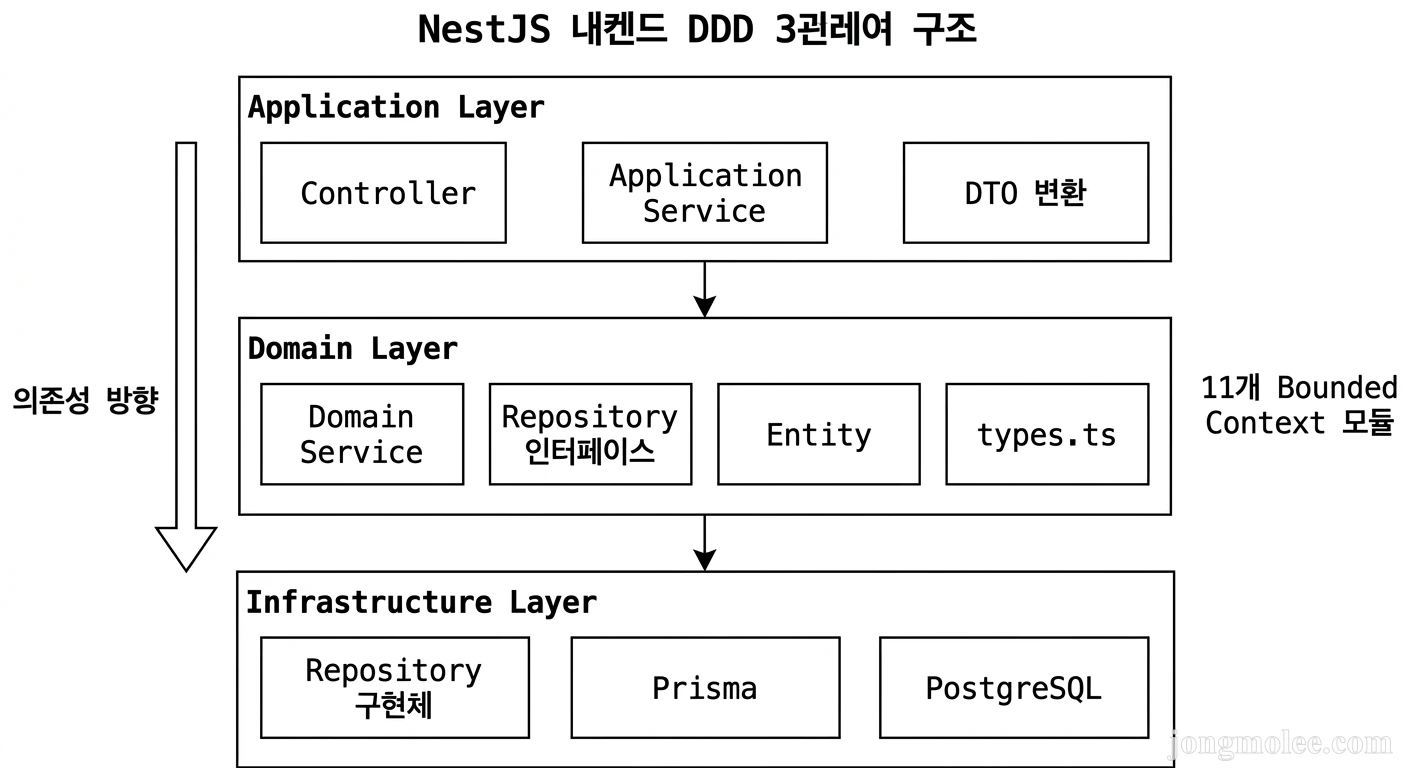
계층 정의
| 계층 | 책임 | 의존 방향 |
|---|---|---|
| Repository | DB 접근, 영속성 | Prisma ← 이 계층만 Prisma를 안다 |
| Domain Service | 순수 비즈니스 로직 | Repository 인터페이스에만 의존 |
| Application Service | 오케스트레이션, DTO 변환 | Domain Service + Repository 조합 |
의존성 방향은 한 방향이다. Application → Domain → Repository. 역방향 의존은 금지.
Application Layer (Controller, AppService, DTO)
         │
         ▼
Domain Layer (Domain Service, Repository Interface, Entity)
         │
         ▼
Infrastructure Layer (Repository 구현체, Prisma, PostgreSQL)
⚠️ 주의: 여기서 핵심은 Domain Layer가 Prisma를 직접 import하지 않는다는 것이다. Domain Service는
IStudentRepository같은 인터페이스에만 의존하고, 실제 Prisma 호출은 Repository 구현체가 담당한다.
왜 이렇게 나눠야 하냐면, Domain Service를 테스트할 때 DB 없이 Mock Repository만 주입하면 되기 때문이다. 비즈니스 로직 검증에 PostgreSQL 연결이 필요 없어진다.
🔧 1단계 — Repository 계층 구축 (커밋 #15)
가장 먼저 한 일은 기반 타입과 인터페이스를 정의하는 것이었다. domain/common/ 폴더를 만들고 세 파일을 작성했다.
types.ts — 도메인 공통 타입
// domain/common/types.ts
export type EntityId = string | number;

export type TransactionContext = Omit<
  PrismaClient,
  '$connect' | '$disconnect' | '$on' | '$transaction' | '$use'
>;EntityId를 string | number로 정의한 이유가 있다. 5편에서 PK를 CUID(string) → Mixed Strategy(string + number)로 바꿨는데, Repository 인터페이스 레벨에서 PK 타입에 종속되지 않으려면 유니온 타입이 필요했다.
TransactionContext는 Prisma의 트랜잭션 클라이언트 타입이다. $transaction 콜백 안에서 받는 tx 파라미터의 타입을 정의한 것. 모든 Repository 메서드에 선택적으로 tx를 받을 수 있게 해서, 트랜잭션 경계를 Application Layer에서 결정할 수 있도록 했다.
base.repository.ts — 베이스 인터페이스
// domain/common/base.repository.ts
export interface BaseRepository<T> {
  findById(id: EntityId, tx?: TransactionContext): Promise<T | null>;
  save(entity: T, tx?: TransactionContext): Promise<void>;
  update(entity: T, tx?: TransactionContext): Promise<void>;
}
모든 Repository가 상속하는 최소 계약. findById, save, update 세 개뿐이다. 화려한 제네릭을 넣고 싶은 유혹을 참았다. 필요한 건 나중에 추가하면 되고, 지금 중요한 건 “모든 Repository는 이 세 가지는 반드시 구현한다”라는 규약을 세우는 것.
errors.ts — 도메인 에러
// domain/common/errors.ts
export class EntityNotFoundError extends Error {
  constructor(entityName: string, id: string | number) {
    super(`${entityName} with id ${id} not found`);
    this.name = 'EntityNotFoundError';
  }
}

export class BusinessRuleViolationError extends Error {
  constructor(message: string) {
    super(message);
    this.name = 'BusinessRuleViolationError';
  }
}
HTTP 상태 코드에 의존하지 않는 순수 도메인 에러다. NotFoundException은 NestJS 종속이라 Domain Layer에서 쓰면 안 된다. 대신 EntityNotFoundError를 던지고, Application Layer의 ExceptionFilter에서 HTTP 404로 변환한다.
🔍 단서: 이 분리가 나중에 진가를 발휘했다. v2 리팩토링 때 Domain Layer를 통째로 옮기면서도 에러 핸들링 코드를 한 줄도 안 바꿔도 됐다.
Repository 인터페이스 + 구현체
기반 타입이 준비됐으니, 엔티티별 Repository를 만들 차례. 첫 타자는 StudentRepository였다.
// domain/student/student.repository.interface.ts
export interface IStudentRepository extends BaseRepository<Student> {
  findByEmail(email: string, tx?: TransactionContext): Promise<Student | null>;
  findByLoginId(loginId: string, tx?: TransactionContext): Promise<Student | null>;
  findByClassId(classId: EntityId, tx?: TransactionContext): Promise<Student[]>;
  findActiveStudents(tx?: TransactionContext): Promise<Student[]>;
  findByConsecutiveDays(
    type: 'poor' | 'excellent' | 'normal',
    days: number,
    tx?: TransactionContext,
  ): Promise<Student[]>;
}BaseRepository<Student>를 상속하면서, 도메인에 필요한 쿼리 메서드를 추가했다. findByConsecutiveDays 같은 건 레벨 조정 배치에서 쓰는 메서드인데, 이런 도메인 특화 쿼리를 인터페이스에 명시하는 게 Repository 패턴의 핵심이다.
구현체는 Prisma를 감싸는 형태다.
// domain/student/student.repository.ts
@Injectable()
export class StudentRepository implements IStudentRepository {
  constructor(private readonly prisma: PrismaService) {}

  private getClient(tx?: TransactionContext) {
    return tx || this.prisma;
  }

  async findById(id: EntityId, tx?: TransactionContext): Promise<Student | null> {
    const client = this.getClient(tx);
    return await client.student.findUnique({
      where: { id: String(id) },
      include: { user: true },
    });
  }

  async save(student: Student, tx?: TransactionContext): Promise<void> {
    const client = this.getClient(tx);
    await client.student.create({ data: student });
  }

  // ...
}
getClient(tx) 패턴이 포인트다. 트랜잭션이 주어지면 트랜잭션 클라이언트를 쓰고, 아니면 기본 Prisma를 쓴다. 이걸로 트랜잭션 참여 여부를 호출자가 결정할 수 있게 됐다.
첫 번째 커밋에서 5개 Repository를 만들었다. Student, Level, Assignment, ContentItem, ContentAttempt. 1,825줄 추가.
⚙️ 2단계 — Domain Service 구축 (커밋 #17)
Repository가 준비됐으니, 이제 비즈니스 로직을 담을 Domain Service를 작성할 차례다.
가장 핵심적인 서비스부터 만들었다. 태스크 생성 알고리즘을 담는 BlockGenerationService.
// domain/services/block-generation.service.ts
@Injectable()
export class BlockGenerationService {
  private readonly METRIC_SIMILARITY_MAP: Record<MetricCode, MetricCode[]> = {
    METRIC_A: [MetricCode.METRIC_B],
    METRIC_B: [MetricCode.METRIC_C, MetricCode.METRIC_A],
    METRIC_C: [MetricCode.METRIC_B],
    METRIC_D: [MetricCode.METRIC_E],
    METRIC_E: [MetricCode.METRIC_D],
  };

  constructor(
    private readonly contentItemRepository: IContentItemRepository,
    private readonly levelRepository: ILevelRepository,
  ) {}

  async generateBlock(input: BlockGenerationInput): Promise<BlockGenerationResult> {
    const blockType =
      input.completedCustomizedCount % 3 === 0
        ? BlockType.REMIND
        : BlockType.CUSTOMIZED;

    if (blockType === BlockType.CUSTOMIZED) {
      return await this.generateCustomizedBlock(input);
    } else {
      return await this.generateRemindBlock(input);
    }
  }
}
이 코드에서 주목할 부분이 두 가지 있다.
첫째, constructor에 구현체가 아닌 인터페이스 타입이 들어간다. IContentItemRepository, ILevelRepository. 이 서비스는 “콘텐츠를 어떻게 쿼리하는지”는 모른다. “콘텐츠 후보를 달라”고 요청만 한다. 실제 Prisma 쿼리가 어떻게 생겼는지는 Repository 구현체의 관심사다.
둘째, METRIC_SIMILARITY_MAP 같은 비즈니스 규칙이 서비스 안에 있다. DB에 저장할 수도 있지만, 이 매핑은 도메인 전문가가 정한 고정 규칙이다. 코드로 표현하는 게 맞다. 변경 빈도가 낮고, 변경 시 코드 리뷰를 거쳐야 하는 종류의 규칙이니까.
이 커밋에서 만든 Domain Service는 5개다.
| 서비스 | 역할 |
|---|---|
BlockGenerationService | 태스크 그룹 생성 알고리즘 (맞춤/리마인드) |
ContentCooldownService | 콘텐츠 쿨다운 관리 |
CurriculumEvaluationService | 진행 트랙 달성도 평가 |
LevelAdjustmentDecisionService | 스킬 레벨 조정 판단 |
MetricAggregationService | 퍼포먼스 지표 집계 (TOP 5) |
총 2,591줄. 순수 비즈니스 로직만 들어있다. HTTP도 없고, res.json()도 없다.
📌 핵심: Domain Service의 단위 테스트를 작성할 때
PrismaService를 mock할 필요가 없다. Repository 인터페이스만 mock하면 된다. 테스트 셋업이 5줄에서 2줄로 줄어든다.
📦 3단계 — Application Service 구축 (커밋 #18)
Application Service의 역할은 오케스트레이션이다. Domain Service와 Repository를 조합해서 유즈케이스 흐름을 완성한다.
// application/services/assignment.application.service.ts
@Injectable()
export class AssignmentApplicationService {
  private readonly EXCELLENT_THRESHOLD = 90;
  private readonly POOR_THRESHOLD = 70;
  private readonly MIN_CUSTOMIZED_BLOCKS = 3;

  constructor(
    private readonly prisma: PrismaService,
    private readonly blockGenerationService: BlockGenerationService,
    private readonly eventEmitter: EventEmitter2,
  ) {}

  async generateRollingAssignment(dto: GenerateRollingAssignmentDto) {
    // 1. 유저 조회
    const student = await this.prisma.student.findUnique({
      where: { id: dto.studentId },
    });
    if (!student || !student.currentLevelId) {
      throw new NotFoundException('유저를 찾을 수 없거나 스킬 레벨이 배치되지 않았습니다.');
    }

    // 2. 태스크 생성
    const assignment = await this.prisma.assignment.create({
      data: {
        studentId: dto.studentId,
        status: AssignmentStatus.ACTIVE,
        source: dto.source,
        runtimeMinutes: dto.runtimeMinutes || 30,
        scheduledAt: new Date(),
        attemptCount: 1,
      },
    });

    // 3. 첫 태스크 그룹 생성 (Domain Service 위임)
    const blockResult = await this.generateNextBlock({
      assignmentId: assignment.id,
      studentId: dto.studentId,
    });

    // 4. 이벤트 발행
    this.eventEmitter.emit('assignment.created', { ... });

    return { assignment, firstBlock: blockResult };
  }
}
Application Service에서 눈여겨볼 패턴 세 가지.
1. DTO를 받고, 도메인 객체를 반환한다. Controller에서 넘어온 DTO를 Domain Service가 이해할 수 있는 형태로 변환하고, 결과를 다시 Response DTO로 포장한다. 이 변환이 Application Layer의 핵심 책임이다.
2. 트랜잭션 경계를 결정한다.
여러 Repository를 호출해야 하는 작업이면, $transaction으로 감싸는 건 이 레이어에서 한다. Domain Service는 트랜잭션을 모른다.
// 트랜잭션 패턴 — Application Layer에서 경계 설정
await this.prisma.$transaction(async (tx) => {
  await this.bundleRepo.save(bundle, tx);
  await this.contentRepo.save(content, tx);
  await this.metricService.aggregate(studentId, tx);
});
3. 도메인 이벤트를 발행한다.
EventEmitter2를 통해 이벤트를 발행하는 건 Application Service의 몫이다. Domain Service가 이벤트를 직접 발행하면 @nestjs/event-emitter에 종속되니까.
이 커밋에서 만든 Application Service는 6개, DTO는 7개. 총 2,657줄.
🧩 4단계 — 모듈 구성과 의존성 연결 (커밋 #19)
코드를 다 짜도, NestJS에게 “이 인터페이스에 저 구현체를 넣어줘”라고 알려주지 않으면 런타임에 터진다. 이 단계에서 11개 Bounded Context 모듈을 만들고, DI 연결을 완성했다.
// modules/assignment/assignment.module.ts
@Module({
  providers: [
    AssignmentRepository,
    BlockGenerationService,
    ContentItemRepository,
    LevelRepository,
  ],
  exports: [AssignmentRepository, BlockGenerationService],
})
export class AssignmentModule {}
그리고 AppModule이 이 구조를 조립한다.
// ✅ After — v2 AppModule
@Module({
  imports: [
    // 핵심 인프라 (Global)
    DatabaseModule,
    CommonModule,
    EventModule,

    // Bounded Context 모듈 (11개)
    StudentModule,
    ContentModule,
    AssignmentModule,
    LevelAdjustmentModule,
    LevelModule,
    MetricModule,
    CurriculumModule,
    DiagnosticModule,
    LearningActivityModule,
    OrganizationModule,
    AttendanceModule,
  ],
  controllers: [AppController],
  providers: [AppService],
})
export class AppModule {}
v1의 AppModule과 비교해보면 차이가 극명하다.
// ❌ Before — v1 AppModule
@Module({
  imports: [UserModule, DomainModule],
  controllers: [AppController],
  providers: [AppService, PrismaService],
})
export class AppModule {}
모듈 2개에서 14개로 늘었다. 코드량은 폭증했지만, 각 모듈의 책임이 명확해졌다. AssignmentModule은 태스크 관련만, StudentModule은 유저 관련만.
⚠️ 주의: 모듈 11개를 만들 때 가장 신경 쓴 건 순환 의존 방지였다.
AssignmentModule이StudentModule을 import하고,StudentModule이 다시AssignmentModule을 import하면 NestJS가 부팅 시 터진다. 의존 그래프를 한 방향으로 유지하는 게 중요하다.
이 커밋에서 1,737줄이 추가됐다. 11개 모듈 정의, DatabaseModule(PrismaService 글로벌화), CommonModule(에러 필터, 인터셉터), EventModule(도메인 이벤트), 그리고 main.ts 재구성.
📊 Before vs After — 숫자로 보는 변화
4개 커밋으로 총 8,810줄이 추가됐다. 파일 수도 크게 늘었다. 하지만 단순히 코드가 늘어난 게 아니라, 구조가 생긴 것이다.
디렉토리 구조 비교
❌ Before (v1)                    ✅ After (v2)
src/                              src/
├── app.module.ts                 ├── application/
├── prisma.service.ts             │   ├── controllers/
└── user/                         │   ├── services/      ← 오케스트레이션
    ├── user.controller.ts        │   └── dtos/
    ├── user.module.ts            ├── domain/
    └── user.service.ts           │   ├── common/        ← 타입, 에러
                                  │   │   ├── types.ts
                                  │   │   ├── base.repository.ts
                                  │   │   └── errors.ts
                                  │   ├── services/      ← 비즈니스 로직
                                  │   ├── student/       ← Repository
                                  │   ├── content/
                                  │   ├── assignment/
                                  │   └── ...
                                  ├── modules/           ← 11개 Bounded Context
                                  │   ├── student/
                                  │   ├── content/
                                  │   ├── assignment/
                                  │   └── ...
                                  ├── common/            ← Guards, Filters
                                  └── events/            ← 도메인 이벤트
핵심 차이 요약
| 항목 | Before (v1) | After (v2) |
|---|---|---|
| 파일 수 | 6개 | 50개+ |
| 계층 | 1계층 (Service = 모든 것) | 3계층 (Repo/Domain/App) |
| DB 접근 | 어디서나 PrismaService | Repository 구현체만 |
| 비즈니스 로직 | Service에 뒤섞임 | Domain Service에 격리 |
| 테스트 | DB 연결 필수 | Mock Repository로 단위 테스트 |
| 트랜잭션 | 각 서비스에서 직접 | Application Layer에서 결정 |
| 모듈 | 2개 | 14개 (Bounded Context) |
🛡️ 돌아보며 — 이 결정이 옳았는지
솔직히 말하면, 이 시점에서 DDD를 도입한 건 과잉 설계에 가까웠을 수도 있다. 아직 API 엔드포인트 하나 없는 상태에서 3계층을 나누고 11개 모듈을 만든 거니까.
그런데 이 투자가 회수되는 순간이 바로 왔다. 다음 편에서 다룰 인터페이스 구현체 전환(커밋 #20), 그리고 v2.0 대전환에서 스키마를 통째로 바꿀 때, Repository 인터페이스 덕분에 Domain Service는 한 줄도 안 고쳐도 됐다. 구현체만 교체하면 끝.
1인 개발에서 DDD가 필요한가? 보통은 아니다. 그런데 도메인이 복잡하고, 스키마 변경이 예정되어 있고, 장기 프로젝트라면 이야기가 다르다. 초기 투자 3일이 이후 3개월의 리팩토링 비용을 절약해줬다.
📌 핵심: DDD는 “지금” 필요해서 도입하는 게 아니라, “곧 필요해질 것”을 알기 때문에 도입하는 것이다. 27개 테이블, 10개 유즈케이스를 가진 도메인에서 레이어 분리 없이 간다면, v2 리팩토링 때 전부 갈아엎어야 했을 것이다.
📋 정리 — 핵심 요약
| 계층 | 파일 위치 | 역할 | 의존 대상 |
|---|---|---|---|
| Repository | domain/{entity}/ | DB 영속성 | PrismaService |
| Domain Service | domain/services/ | 순수 비즈니스 로직 | Repository 인터페이스만 |
| Application Service | application/services/ | 오케스트레이션, DTO 변환 | Domain Service + Repository |
| Module | modules/{context}/ | DI 연결, Bounded Context | 위 세 계층 조립 |
| 안티패턴 | 권장 패턴 |
|---|---|
❌ Service에서 PrismaService 직접 호출 | ✅ Repository를 통해 간접 접근 |
| ❌ 비즈니스 로직에 HTTP 에러 던지기 | ✅ 도메인 에러 → ExceptionFilter에서 변환 |
| ❌ 하나의 Service에 모든 로직 | ✅ Domain(로직) + Application(오케스트레이션) 분리 |
| ❌ 트랜잭션을 Domain Layer에서 결정 | ✅ Application Layer에서 $transaction 경계 설정 |
| ❌ 구현체에 직접 의존 | ✅ 인터페이스에 의존, DI로 구현체 주입 |
다음 편에서는 이 3계층 위에 인터페이스 구현체 전환을 올리는 과정을 다룬다. StudentRepository를 IStudentRepository로 바꾸고, NestJS DI 컨테이너에서 느슨한 결합을 완성하는 이야기.
📚 NestJS + Refine 풀스택 트러블슈팅 시리즈 (63편)
- 1. 왜 NestJS + Prisma를 선택했나 — B2B SaaS 백엔드 기술 선택기
- 2. 도메인 모델링 첫날 — B2B SaaS의 핵심 엔티티 정의하기
- 3. 27개 테이블의 탄생 — Prisma 스키마 설계기
- 4. 권한 매트릭스 — Admin/운영자/사용자 3역할 설계
- 5. BigInt PK에서 Int PK로 — 첫 번째 스키마 리팩토링
- 6. Seed 데이터의 함정 — FK 삭제 순서 삽질기
- 7. DDD를 도입하기로 했다 — Repository/Domain/Application 3계층
- 8. 인터페이스 구현체로 바꾸는 날 — NestJS DI와 TypeScript의 간극
- 9. 단위 테스트 인프라 구축 — Jest 설정부터 Mock까지
- 10. E2E 테스트와 Cloud SQL의 고난 — 4/8 passing에서 8/8까지
- 11. REST API 첫 구현 — 6개 Controller, 21개 엔드포인트 완성
- 12. v1.0 완성, 그리고 갈아엎기로 결심한 날
- 13. 번들 구조를 통째로 바꿔야 했던 이유
- 14. Phase 1 문서 정비 — Use Case를 번들 기반으로 다시 쓰다
- 15. Phase 2 스키마 마이그레이션 — 데이터 안 날리고 구조 바꾸기
- 16. Phase 3-1·3-2 — Repository와 Domain 서비스로 36개 빌드 에러 잡기
- 17. Phase 3-3·3-4·3-5 — Application부터 Module까지, v2.0 마이그레이션 닫는 날
- 18. 코드를 박은 다음 날 — 4,658줄 DDD 문서를 24분 사이에 다시 쓴 하루
- 19. v2.1 Domain Layer — 도메인 서비스 1,682줄을 한 커밋에 박은 날의 설계 철학
- 20. v3.0 Application Layer 재작성 — 도메인 서비스 위에 얇은 막을 한 Phase에 박은 날
- 21. 갈아엎고 80일 — v2.0 마이그레이션 8편 메타 회고
- 22. 1인 다역으로 5일 만에 90% — Admin Portal MVP를 끌어올린 토글 한 줄
- 23. Mock에선 되던 게 REST에선 안 됐다 — 응답 포맷 한 칸 차이가 만든 하루
- 24. CORS는 됐다 — PATCH만 빼고. allowedHeaders 한 줄과 Vite 프록시의 소문자 메서드
- 25. 멀티테넌트 누수 — tenantId 3계층 강제
- 26. Prisma 정책 싱글톤 — zod superRefine 임계값 가드
- 27. 멀티테넌트 쓰기 가드 — body.tenantId 차단과 집계 일관성
- 28. 두 번째 점검은 합류 지점이었다 — Admin Portal 2차에서 한 사이클에 잡힌 FE-BE 연동 버그 11건
- 29. Prisma 그래프 스키마 — 선형 레벨을 DAG로 옮긴 4가지 결정
- 30. 교육과정 구조 리팩토링 — 3필드 분리와 폴백 결정기
- 31. 배치고사 MVP — 자동 레벨 배치를 걷어내고 5지표 측정만 남기다
- 32. JWT Guard 적용 — request.user undefined부터 jwt malformed까지
- 33. 디버깅용 운영 API 7개 — Unity 만료 테스트 30분 대기를 0초로
- 34. NestJS Swagger 일괄 적용 — 35개 컨트롤러 + DTO 22개
- 35. Unity ↔ 웹 PostMessage 브릿지 설계기
- 36. Vuplex 브릿지 초기화 타이밍 — 첫 메시지가 증발한 이유
- 37. 콘텐츠 브릿지 10종 통합 완료 — 같은 규격으로 묶기
- 38. 지표 누계 시스템 — TOP5 순위를 INSERT 전용 스냅샷으로 굳히기
- 39. 킥오프 배치 첫 구현 — 매시 전체 EXPIRED 사고와 Winston 도입
- 40. 혼자 여러 역할로 QA 1차 — 브랜치 미동기화와 잔존 토큰의 함정
- 41. 타이머가 NaN:NaN으로 떴다 — Bundle API 응답 누락 필드와 비어 있는 콘텐츠 후보
- 42. 1인 개발 QA 5라운드 — 타이머·시드·스키마로 옮긴 버그들
- 43. Unity Lobby + 배치고사 씬 통합 — 두 클라이언트가 같은 회원을 보는 첫 빌드
- 44. 배치고사 MVP 후속 — 명세를 코드로 옮기고 레거시 571줄을 일괄 삭제하다
- 45. Problem 종속 끊기 — 1,891개 마이그레이션과 단위 테스트 38건
- 46. NestJS 권한 가드 — 목록은 막고 상세는 뚫린 날
- 47. 콘텐츠 후보 선택 3차 최적화 — 단일 쿼리로 옮기기
- 48. 재화 시스템 첫 머지 — 코인 지갑과 거래 원장(Wallet API)
- 49. 회원 레포트 5탭 API 설계 — 인사이트 3파트 구조
- 50. 보호자 외부 뷰어 대시보드 — 모바일 앱·초대 토큰 회원가입
- 51. 외부 뷰어 리포트 v1→v2 토큰 전환 — 가장 길었던 하루
- 52. 외부 뷰어 리포트 인사이트 — 활동 데이터를 자연어로 바꾸기
- 53. Framer Motion whileInView — 일부 카드만 안 뜨던 날
- 54. 외부 뷰어 리포트 4탭 N+1 — 14초 응답을 2초로
- 55. Cloud SQL 리전 트랩 — US→Taiwan 71% 트러블슈팅
- 56. QR 배치고사 + Firebase Hosting 멀티 사이트 배포
- 57. 1,974줄 풀 백업 — 1인 개발에서 상태 관리하는 법
- 58. 주간 출석 KST 타임존 — 월요일이 사라진 트러블슈팅
- 59. 연락처 포맷 통일 — 저장은 숫자만, 표시는 하이픈
- 60. react-hook-form + Zod 폼 표준 정착기
- 61. Soft Delete 구현 — deletedAt 한 컬럼이 닿은 27곳의 설계
- 62. 교육과정 자동 승급의 늪 — 도메인 버그 3 건 트러블슈팅
- 63. 교육과정 도메인 BE 완성과 같은 날 핫픽스 7 건 — NestJS @Cron 2 중 실행 묶음