Soft Delete 필터가 빠진 곳 찾기 — 삭제한 데이터가 되살아나는 미스터리
📚 NestJS 실전 트러블슈팅 시리즈 (12편)
NestJS + Prisma 프로젝트에서 Soft Delete 필터를 Application Service에만 적용하고 Domain Repository를 누락하면, 삭제된 데이터가 배치 프로세스와 조회 API에서 좀비처럼 되살아난다. PM 코드 리뷰에서 11곳 추가 발견된 실전 사례를 통해, 레이어별 필터 점검 체크리스트와 grep 기반 검증법을 정리한다.
💡 Tip. 바쁜 현대인들을 위한 본문 요약
- Soft Delete(
deletedAt)를 도입하면 모든 조회 쿼리에deletedAt: null필터를 추가해야 한다- Application Service에만 필터를 걸고 Domain Repository를 누락하면, 삭제된 데이터가 여전히 조회된다
- 특히 배치 프로세스에서 삭제된 사용자에게 알림이 가거나 과제가 생성되는 치명적 버그로 이어진다
- PM 코드 리뷰에서 11곳이 추가로 발견됐다 — 사람 눈으로는 놓치기 쉽다
grep -rn "deletedAt"검증과 레이어별 체크리스트로 누락 제로를 달성하는 방법을 정리한다
🔍 증상 — 삭제한 사용자가 왜 아직 여기에?

운영 환경에서 이상한 보고가 들어왔다.
“퇴원 처리한 학생한테 과제 알림이 갔어요.”
관리자 화면에서 학생을 삭제하면, 목록에서는 사라진다. 그런데 배치 프로세스가 돌면서 삭제된 학생에게도 과제를 생성하고 있었다.
더 파보니 문제가 한두 곳이 아니었다.
- 반(Class) 목록 API에서 삭제된 반이 조회됨
- 교사 상세 API에서 삭제된 교사의 정보가 반환됨
- 대시보드 통계에 삭제된 학생 수가 포함됨
공통점은 하나.
Soft Delete 필터(deletedAt: null)가 빠진 곳이 있었다.
Soft Delete란?
데이터를 실제로 DELETE하지 않고, deletedAt 컬럼에 삭제 시각을 기록하는 패턴이다.
-- Hard Delete: 물리 삭제
DELETE FROM student WHERE id = 'abc123';

-- Soft Delete: 논리 삭제
UPDATE student SET "deletedAt" = NOW() WHERE id = 'abc123';
복구가 가능하고, 감사 로그(audit trail)를 남길 수 있어서 엔터프라이즈 프로젝트에서 많이 쓴다.
대신 모든 조회 쿼리에 WHERE deletedAt IS NULL을 붙여야 한다는 대가가 따른다.
이걸 하나라도 빠뜨리면?
삭제한 데이터가 좀비처럼 되살아난다 💀
🎯 원인 — Application Service만 고치고 Repository는 잊었다

Prisma 스키마에 deletedAt 필드를 추가한 건 깔끔했다.
model Student {
  id        String    @id @default(cuid())
  userId    String    @unique
  academyId Int
  // ... 생략
  deletedAt DateTime? @db.Timestamptz // soft delete

  @@index([academyId, deletedAt])
}

model Class {
  id        Int       @id @default(autoincrement())
  academyId Int
  name      String
  // ... 생략
  deletedAt DateTime? @db.Timestamptz // soft delete

  @@index([academyId, deletedAt])
}
인덱스도 [academyId, deletedAt] 복합으로 잡아서 쿼리 성능까지 챙겼다.
문제는 필터를 어디까지 적용했느냐였다.
1차 수정 범위 (개발자가 한 것)
Application Service 레이어에 집중해서 16곳을 수정했다.
✅ academy-student.application.service.ts (4곳)
✅ academy-class.application.service.ts (5곳)
✅ academy-teacher.application.service.ts (3곳)
✅ batch-process.application.service.ts (2곳)
✅ student-auth.application.service.ts (2곳)
여기까지만 보면 꽤 꼼꼼해 보인다.
누락된 곳 (PM 리뷰에서 발견)
그런데 PM이 코드 리뷰를 하면서 Domain Repository 레이어를 점검했다. 결과? 11곳이 추가로 필요했다.
❌ student.repository.ts (6곳 누락)
❌ class.repository.ts (5곳 누락)
왜 빠졌을까?
NestJS의 계층 구조를 떠올려보면 답이 나온다.
Controller → Application Service → Domain Repository → Prisma ClientApplication Service에서 직접 this.prisma.student.findMany({ where: { deletedAt: null } }) 같은 쿼리를 쓰는 곳도 있지만, Domain Repository를 통해서 조회하는 곳도 있다.
Repository 메서드에 필터가 없으면? Service에서 아무리 조심해도, Repository를 호출하는 순간 삭제된 데이터가 딸려온다.
🛠️ 해결 — 레이어별 필터 전수 조사
❌ Before: 필터 없는 Repository 메서드
// student.repository.ts — 수정 전
async findById(id: EntityId, tx?: TransactionContext): Promise<StudentWithRelations | null> {
  const client = this.getClient(tx);
  return await client.student.findFirst({
    where: { id: String(id) },  // ← deletedAt 필터 없음!
    include: STUDENT_INCLUDE,
  }) as StudentWithRelations | null;
}

async findByEmail(email: string, tx?: TransactionContext): Promise<StudentWithRelations | null> {
  const client = this.getClient(tx);
  return await client.student.findFirst({
    where: {
      user: { email },  // ← deletedAt 필터 없음!
    },
    include: STUDENT_INCLUDE,
  }) as StudentWithRelations | null;
}findById에 필터가 없으면, 삭제된 학생의 ID를 넘겨도 정상 조회된다.
마치 삭제하지 않은 것처럼.
✅ After: 모든 조회 메서드에 필터 추가
// student.repository.ts — 수정 후
async findById(id: EntityId, tx?: TransactionContext): Promise<StudentWithRelations | null> {
  const client = this.getClient(tx);
  return await client.student.findFirst({
    where: { id: String(id), deletedAt: null },  // ✅ Task 58.6 보완
    include: STUDENT_INCLUDE,
  }) as StudentWithRelations | null;
}

async findByEmail(email: string, tx?: TransactionContext): Promise<StudentWithRelations | null> {
  const client = this.getClient(tx);
  return await client.student.findFirst({
    where: {
      deletedAt: null,  // ✅ 추가
      user: { email },
    },
    include: STUDENT_INCLUDE,
  }) as StudentWithRelations | null;
}
같은 패턴으로 class.repository.ts도 수정했다.
// class.repository.ts — 수정 후
async findById(id: EntityId, tx?: TransactionContext): Promise<Class | null> {
  return this.getClient(tx).class.findFirst({
    where: { id: Number(id), deletedAt: null },  // ✅ Task 58.6 보완
  });
}

async findByAcademyId(academyId: EntityId, tx?: TransactionContext): Promise<Class[]> {
  return this.getClient(tx).class.findMany({
    where: { academyId: Number(academyId), deletedAt: null },  // ✅ 추가
    orderBy: [{ grade: 'asc' }, { semester: 'asc' }, { name: 'asc' }],
  });
}
배치 프로세스 — 가장 위험한 누락 지점
배치 프로세스는 사용자 요청이 아니라 스케줄러가 자동으로 실행한다. 필터가 빠지면 삭제된 사용자에게 과제가 생성되고, 알림이 발송된다.
// batch-process.application.service.ts — 수정 후
const activeClasses = await this.prisma.class.findMany({
  where: { deletedAt: null },  // ✅ 삭제된 반 제외
});

for (const classItem of activeClasses) {
  const students = await this.prisma.student.findMany({
    where: {
      deletedAt: null,  // ✅ 삭제된 학생 제외
      classStudents: {
        some: { classId: classItem.id, unassignedAt: null },
      },
    },
    include: {
      user: { select: { loginId: true } },
    },
  });
  // ... 과제 생성 로직
}
이 두 줄(deletedAt: null)이 없었다면?
퇴원한 학생에게 과제가 생성되고, 학부모에게 알림이 간다.
운영팀에 문의가 쏟아진다.
한 줄의 필터가 CS(고객지원) 건수를 좌우한다.
관계 필터 — 조인된 데이터도 확인
soft delete가 있는 모델을 조인할 때도 필터가 필요하다.
// academy-teacher.application.service.ts
// 교사의 담당 반을 조회할 때, 삭제된 반도 제외해야 한다
const teacher = await this.prisma.teacher.findUnique({
  where: { id: teacherId, academyId, deletedAt: null },
  include: {
    classTeachers: {
      include: { class: { select: { name: true, deletedAt: true } } },
    },
  },
});

// 활성 반만 필터링 — 삭제된 반은 제외
const activeClasses = teacher.classTeachers
  .filter((ct) => ct.class.deletedAt === null);  // ✅ 메모리 필터
Prisma의 include에서는 중첩된 where 조건을 직접 걸기 어려운 경우가 있다.
이럴 때는 일단 가져온 뒤 메모리에서 필터링하는 패턴을 쓴다.
🔎 검증 — grep으로 누락 제로 확인
수정 후에는 모든 deletedAt 사용처를 전수 조사해야 한다.
grep -rn "deletedAt" apps/api/src/ --include="*.ts" | grep -v "node_modules"이 명령어 하나로 프로젝트 전체에서 deletedAt이 사용된 모든 곳을 뽑을 수 있다.
실제로 돌려보면 이런 결과가 나온다.
application/services/academy-student.application.service.ts:108:    deletedAt: null
application/services/academy-class.application.service.ts:76:      deletedAt: null
application/services/batch-process.application.service.ts:61:      where: { deletedAt: null },
application/services/batch-process.application.service.ts:71:          deletedAt: null,
domain/student/student.repository.ts:38:      where: { id: String(id), deletedAt: null },
domain/student/student.repository.ts:53:        deletedAt: null,
domain/class/class.repository.ts:27:      where: { id: Number(id), deletedAt: null },
domain/class/class.repository.ts:36:      where: { academyId: Number(academyId), deletedAt: null },
// ... 총 30+ 곳
점검 포인트
결과를 보면서 다음을 확인한다.
| 체크 | 항목 | 설명 |
|---|---|---|
| ✅ | Application Service | 모든 findMany, findFirst에 필터 있는지 |
| ✅ | Domain Repository | 조회 메서드 전부 필터 있는지 |
| ✅ | Auth Service | 로그인/인증 쿼리에서 삭제된 사용자 차단하는지 |
| ✅ | Batch Process | 스케줄러 쿼리에서 삭제된 데이터 제외하는지 |
| ⚠️ | 통계/집계 | 의도적으로 포함해야 하는 경우도 있음 (예: 전체 가입자 수) |
마지막 항목이 중요하다. 통계 쿼리에서는 삭제된 데이터도 포함해야 할 수 있다.
예를 들어, “올해 총 가입자 수” 같은 통계에서 퇴원한 학생을 빼면 수치가 맞지 않는다.
이런 경우는 deletedAt 필터를 의도적으로 빼고, 주석으로 이유를 남긴다.
// 통계용 — 삭제된 학생도 포함 (전체 가입자 추이 산정)
const totalStudents = await this.prisma.student.count();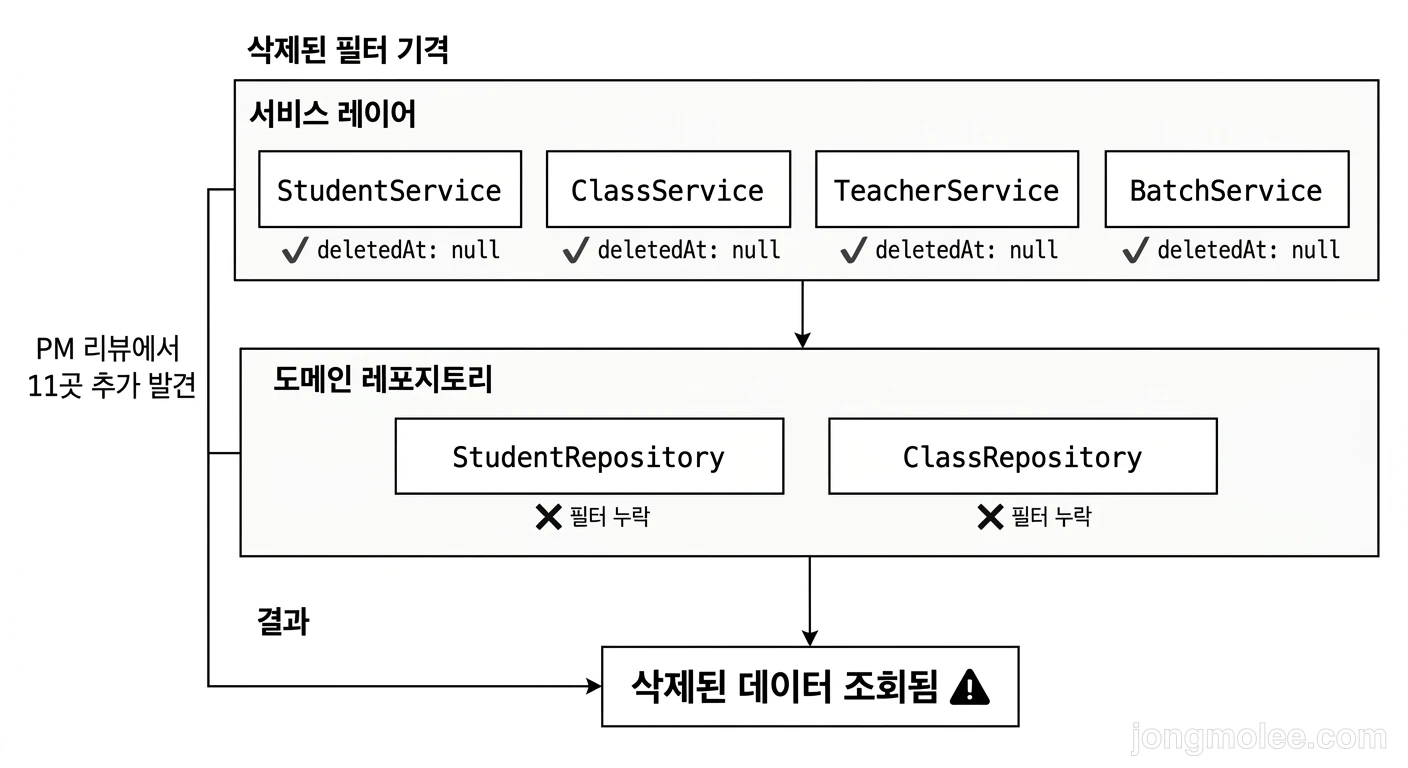
🛡️ 예방 — Prisma Middleware vs 수동 필터

같은 실수를 반복하지 않으려면 구조적인 방어막이 필요하다.
방법 1: Prisma Middleware (자동 필터)
Prisma Client에 미들웨어를 추가하면, 모든 쿼리에 자동으로 deletedAt: null을 주입할 수 있다.
// prisma.service.ts
import { Injectable, OnModuleInit } from '@nestjs/common';
import { PrismaClient } from '@prisma/client';

const SOFT_DELETE_MODELS = ['Student', 'Class', 'Teacher'];

@Injectable()
export class PrismaService extends PrismaClient implements OnModuleInit {
  async onModuleInit() {
    // Soft Delete 자동 필터
    this.$use(async (params, next) => {
      if (SOFT_DELETE_MODELS.includes(params.model ?? '')) {
        if (['findFirst', 'findMany', 'count'].includes(params.action)) {
          params.args.where = {
            ...params.args.where,
            deletedAt: null,
          };
        }
      }
      return next(params);
    });

    await this.$connect();
  }
}
이러면 findFirst, findMany, count 호출 시 자동으로 필터가 붙는다.
수동으로 빠뜨릴 걱정이 없다.
⚠️ Middleware 주의사항
편리하지만 함정이 있다.
- 통계 쿼리에서도 필터가 적용됨 — 삭제된 데이터를 포함해야 하는 경우를 처리하기 어렵다
findUnique는 미적용 — Prisma의findUnique에는 where 조건이 유니크 필드만 받으므로,deletedAt을 추가할 수 없다- 디버깅이 어려움 — 쿼리 로그에는 보이지 않는 숨겨진 조건이 추가됨
- Prisma 5.x에서 deprecated —
$use미들웨어는 Client Extensions로 대체 권장
방법 2: 수동 필터 + grep 검증 (우리가 선택한 방법)
결국 우리 프로젝트에서는 수동 필터 + 체크리스트 + grep 검증을 선택했다.
이유:
- 통계 쿼리 예외 처리가 명확함
- 각 쿼리의 의도가 코드에 드러남
// Task 58.6 보완같은 주석으로 변경 이력 추적 가능
# CI에 추가할 수 있는 검증 스크립트
#!/bin/bash
# soft-delete-check.sh

MODELS=("student" "class" "teacher")

for model in "${MODELS[@]}"; do
  echo "=== Checking $model ==="

  # find/findMany에서 deletedAt 필터가 없는 곳 찾기
  grep -rn "prisma\.$model\.\(findFirst\|findMany\|count\)" apps/api/src/ \
    --include="*.ts" -A 3 | grep -v "deletedAt" | grep -v "node_modules"
done
이 스크립트를 CI에 넣으면, 새로운 쿼리를 추가할 때 deletedAt 필터를 빠뜨리면 잡아낼 수 있다.
방법 3: Prisma Client Extensions (Prisma 5.x+)
Prisma 5.x부터는 $extends를 사용한 Client Extensions가 권장된다.
const prisma = new PrismaClient().$extends({
  query: {
    student: {
      async findMany({ args, query }) {
        args.where = { ...args.where, deletedAt: null };
        return query(args);
      },
      async findFirst({ args, query }) {
        args.where = { ...args.where, deletedAt: null };
        return query(args);
      },
      async count({ args, query }) {
        args.where = { ...args.where, deletedAt: null };
        return query(args);
      },
    },
    // class, teacher도 동일하게 추가
  },
});
$use 미들웨어보다 타입 안전하고, 모델별로 세밀하게 제어할 수 있다.
다만 통계 쿼리 예외 처리를 위해서는 별도의 “unscoped” 클라이언트가 필요하다.
📋 정리 — Soft Delete 필터 체크리스트
핵심 요약
| 레이어 | 확인 항목 | 위험도 |
|---|---|---|
| Application Service | findMany, findFirst 쿼리에 deletedAt: null | 🟡 중간 |
| Domain Repository | 모든 조회 메서드에 필터 | 🔴 높음 — 자주 누락 |
| Auth Service | 삭제된 사용자 로그인 차단 | 🔴 높음 |
| Batch Process | 스케줄러 쿼리 필터 | 🔴 최고 — 자동 실행이라 발견 늦음 |
| 통계/집계 | 삭제 데이터 포함 여부 판단 | 🟡 케이스별 |
Soft Delete 도입 시 필수 작업
- 스키마:
deletedAt DateTime?+ 복합 인덱스(@@index([academyId, deletedAt])) - 삭제 API:
UPDATE SET deletedAt = NOW()(물리 삭제 X) - 모든 조회:
where: { deletedAt: null }필터 추가 - 관계 조회: 조인된 모델의
deletedAt도 확인 - 검증:
grep -rn "deletedAt"전수 조사 - 예외 문서화: 통계 쿼리 등 의도적으로 필터를 빼는 곳은 주석 필수
한 줄 교훈
Soft Delete는 한 줄 추가(
deletedAt)가 아니라, 모든 조회 쿼리에 한 줄씩 추가하는 작업이다. 레이어가 깊을수록 놓치기 쉽다. grep은 거짓말하지 않는다 🔍
📚 NestJS 실전 트러블슈팅 시리즈 (12편)
- 1. NestJS + Prisma에서 N+1 쿼리 문제 해결하기
- 2. NestJS CORS 삽질 총정리 — PATCH만 안 되는 이유
- 3. Prisma 마이그레이션 실수 방지 — 컬럼 누락 해결기
- 4. NestJS DTO 클래스 필수인 이유 — interface로 만들면 터지는 두 가지
- 5. NestJS FK 제약 위반 디버깅 — Level ID 검증으로 500 에러 잡기
- 6. Prisma enum vs 도메인 타입 캐스팅 함정 — TypeScript 타입 불일치 해결기
- 7. Seed 데이터 FK 삭제 순서 삽질 — Prisma deleteMany가 터지는 이유
- 8. NestJS DI 에러 디버깅 — Nest can't resolve dependencies 3가지 원인과 서버 기동 테스트
- 9. Docker 빌드에서 pnpm 모노레포 삽질 — 데코레이터 에러 3132개의 정체
- 10. NestJS 재귀 호출 무한루프 — API 504 타임아웃의 숨겨진 원인 찾기
- 11. Soft Delete 필터가 빠진 곳 찾기 — 삭제한 데이터가 되살아나는 미스터리
- 12. prisma generate 누락 — 빌드는 되는데 런타임 에러가 나는 이유